
Export to Brother, Janome, Tajima and other machines
Choose the right format for your machine, let Tarz check the design, and copy the file to the machine.
| Machine brand | Format to choose |
|---|---|
| Brother, Baby Lock, Bernette (home) | PES (PEC for very old models) |
| Janome, Elna | JEF |
| Tajima, ZSK, SWF, Ricoma, Happy and most industrial machines | DST (TAP for Happy) |
| Melco / Bernina commercial | EXP |
| Pfaff, Husqvarna Viking | VP3 (HUS, SHV, PCS for older models) |
| Singer | XXX |
| Barudan | DSB or U01 |
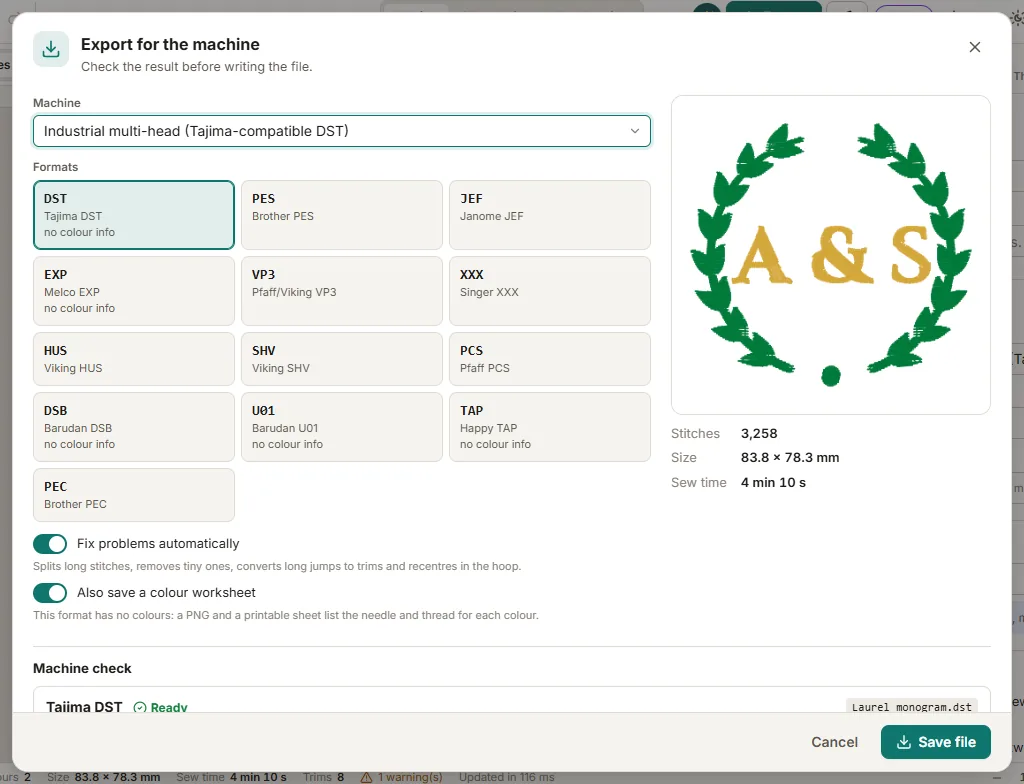
- In the Design panel, choose your machine and hoop before you start: Tarz then keeps the design inside the hoop and respects the machine's limits.
- Open File → Export and pick the format.
- Read the Machine check: hoop overflow, stitches too long or too short, colours versus needles, density, stitch count, file name. Problems that can be fixed safely are fixed automatically with Fix problems automatically (long stitches split, tiny ones removed, long jumps turned into trims, design recentred).
- Click Save file. Formats without colour information (DST, EXP, DSB…) can also save a colour worksheet that lists the needle and thread of each colour — print it for the operator.
- Copy the file to a FAT32 USB stick and plug it into the machine, or use the machine's transfer software.
The machine does not see the file
- Use a USB stick of 32 GB or less, formatted FAT32, and put the file at the root or in the folder your machine expects (some Brother models read only the root).
- Old machines need an 8-character file name without accents: Tarz proposes one when the format requires it.
- Check the hoop size selected in Tarz: a design bigger than the hoop installed on the machine is refused.
Free edition
The Free edition exports up to 5,000 stitches per design. Atelier removes the limit for home machine formats, Pro for every format (including DST) and adds batch export of several formats at once.