
Use the fabric assistant
Choose the fabric you sew on and Tarz Studio adapts density, underlay and pull compensation for every object, and recommends the stabilizer.
Fabric changes everything: a design that is perfect on a polo shirt can pucker on stretch fabric or sink into a towel. The fabric assistant applies proven settings for the fabric to every object of the design.
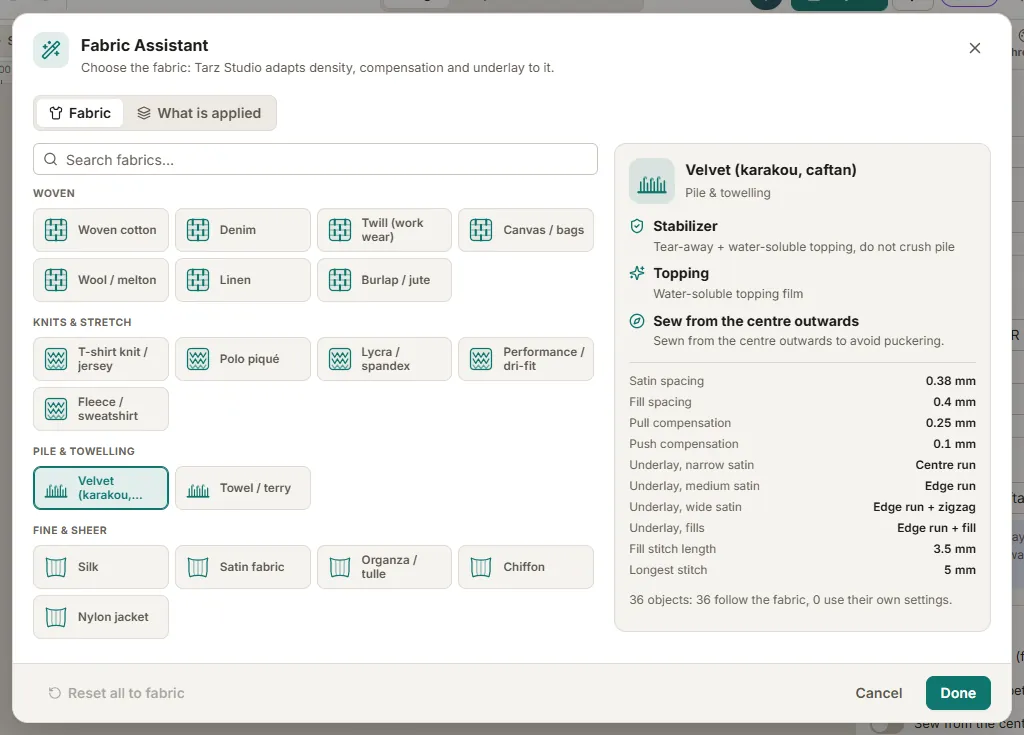
Step by step
- Click an empty spot of the canvas so nothing is selected, then in Properties → Fabric click Assistant (the new-design wizard opens the same picker).
- Pick the fabric: piqué, jersey, stretch, denim, twill, fleece, towel (terry), leather, velvet, satin, linen, caps and more. Search by name in any language.
- Read the summary: row spacing, pull compensation, underlay and the recommended stabilizer and topping.
- Click Apply. Every object that uses the fabric defaults (Properties → Use fabric settings, on by default) is recalculated.
- Check the 3D preview, which now shows the chosen fabric.
What changes
| Fabric | Typical adjustments |
|---|---|
| Piqué (polo) | edge run + tatami underlay, pull compensation about 0.4 mm |
| Stretch, lycra | strong crossed underlay, pull compensation about 0.5 mm, cut-away stabilizer |
| Towel, fleece | dense tatami underlay so stitches stay on top of the pile, water-soluble topping |
| Leather | about 15 % less density to avoid perforating, centre-run underlay, tear-away |
| Velvet | edge + tatami underlay, topping, no very small text |
The values are starting points: Tarz Studio adjusts them per object (satin width, fill size, stitch angle).
Your own values
- Turn off Use fabric settings on an object to keep your own density, underlay and compensation for that object only.
- To keep your own values for one object, turn off Use fabric settings in its properties; the rest of the design still follows the fabric.
On the worksheet
The production worksheet prints the fabric, stabilizer and topping, so the operator prepares the hoop correctly.