
Set up the AI designer: API key or Ollama (offline)
Connect a cloud model with your own API key, or run a free local model with Ollama — no internet needed.
The AI designer turns a request such as "Names Yasmine and Karim in gold on burgundy velvet, 130 × 180 hoop" into a real Tarz design built with Tarz fonts and motifs. Tarz reviews every version like an experienced digitizer (hoop, overlaps, readability, density) and the model corrects it until the design is ready to sew.
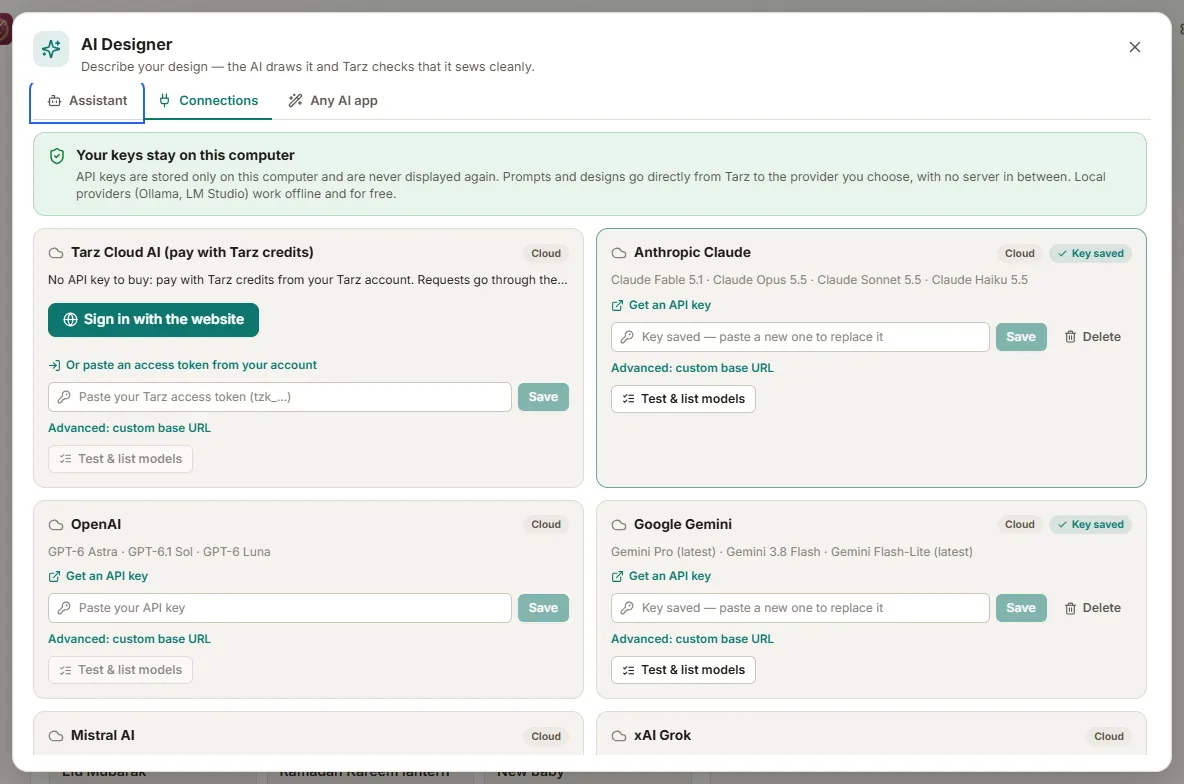
Option A — a cloud model with your API key
- Create an API key with the provider of your choice (Anthropic Claude, OpenAI, Google Gemini, Mistral, DeepSeek, OpenRouter…).
- In Tarz, open the AI designer (top bar, or
Ctrl + I) and go to Connections. - Choose the provider, paste the key and click Test.
- The key is stored on this computer only; it is never sent to Tarz. The provider bills you directly for what you use.
Option B — free and offline with Ollama
- Install Ollama from ollama.com (Windows, macOS, Linux).
- Download a model once, for example
ollama pull qwen3(a vision model such asqwen3-vlcan also read your sketches). - In Tarz → AI designer → Connections, choose Ollama (local, offline, free). The address
http://localhost:11434is filled in for you. - Pick the model in the Assistant tab and describe your design.
LM Studio works the same way (choose LM Studio in Connections and start its local server).
Tip: local models need a recent computer (16 GB of RAM is comfortable). They are slower than cloud models but your requests never leave the workshop.
Using the assistant
Describe the texts, the occasion, the colour of the fabric and the size. Follow the versions and their score, click Open in editor, then ask for changes in your words: "make the names bigger", "add a golden border". You can write in Arabic, French, English or Darija.