
Tarz Cloud AI: credits, limits and the usage meter
Use the AI Designer without your own API key: pay with Tarz credits, see your balance and how much of the conversation and day limits you have used.
Connect
Sign in with the website from AI Designer → Connections → Tarz Cloud AI (or from the Licence window). Nothing to copy: the app is connected to your account. Then pick a Tarz model in the assistant.
Credits
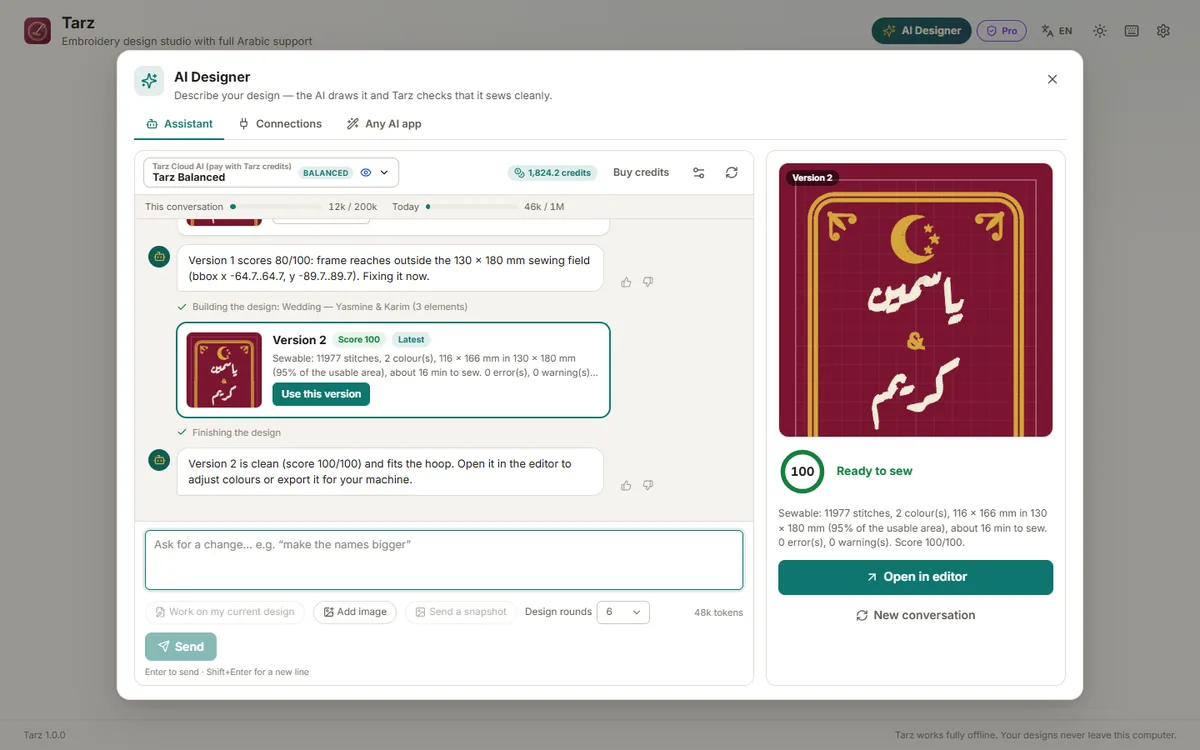
The balance is shown at the top of the assistant. Each answer costs credits according to its length; the cost is taken from your monthly plan credits first, then from purchased credits (they never expire). Buy credits opens your account page.
Limits and the meter
To keep the service fast for everyone, Tarz may set limits:
- This conversation: tokens one conversation can use. When it is reached, click New conversation (the design stays open).
- Today: tokens your account can use per day; it resets at midnight (UTC).
- very large requests (many big images at once) can be refused: send fewer or smaller images.
When limits apply, small bars under the assistant toolbar show how much is used; they turn orange near the limit.
If something goes wrong
- Balance too low: buy credits, then send again.
- Busy or temporarily unavailable: Tarz automatically tries another AI provider; if it persists, retry in a minute.
- The server certificate is not trusted: see the installation article for your server.