
3D puff embroidery step by step
Turn letters and logos into raised embroidery over foam: dense satin, capped ends, perforation and a stop to lay the foam.
3D puff embroidery sews satin columns over a sheet of embroidery foam. The needle perforates the foam along the outline; after sewing, the excess tears away and the letters stand up. Tarz Studio prepares every step automatically.

Design rules
- Use satin columns between about 3 and 10 mm wide. Narrower columns do not hold the foam; wider ones flatten it.
- Avoid fills and small details on puff objects. Simple, bold letters work best.
- Sew flat objects (outlines, small text) before the puff objects.
Step by step
- Select the satin objects to raise.
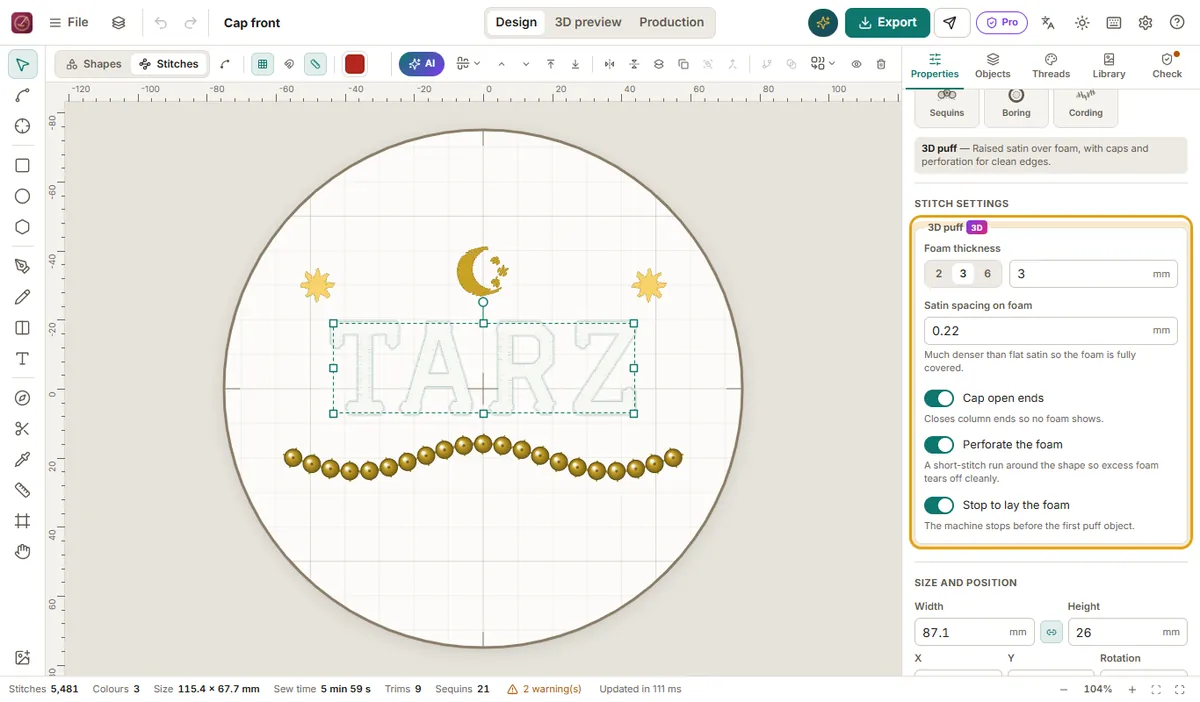
- In Properties → Stitch, turn on 3D puff.
- Set Foam thickness: 2, 3 (default) or 6 mm, the sheet you will use.
- Check the automatic options:
- Puff density (default 0.22 mm): much denser than flat satin so the foam is fully covered.
- Cap ends: closes the open ends of the columns so the foam does not poke out.
- Perforate: adds a running stitch around the outline that cuts the foam.
- Stop for foam: inserts a machine stop before the first puff object.
- Open the 3D preview: the puff objects appear raised.
- Export. The production worksheet shows when to lay the foam.
At the machine
- Sew the flat parts. The machine stops at the stop inserted by Tarz Studio.
- Lay the foam (same colour as the thread if possible) over the area and hold it with tape at the corners.
- Restart: the satin covers the foam and the perforation cuts it.
- Tear away the excess foam; remove small pieces with tweezers. A short blast of hot air (heat gun or hair dryer) shrinks remaining fibres.
Tips
- Underlay is reduced automatically under puff objects so the foam is not flattened.
- On caps, use the cap hoop profile and a firm tear-away stabilizer.
- If the foam shows between stitches, lower the puff density value (denser) or use thinner foam.