
Move your licence to a new computer
Free the seat of your old computer, then activate the new one — even if the old computer no longer starts.
A licence can be active on as many computers as it has seats. To use it on a new computer, first free a seat.
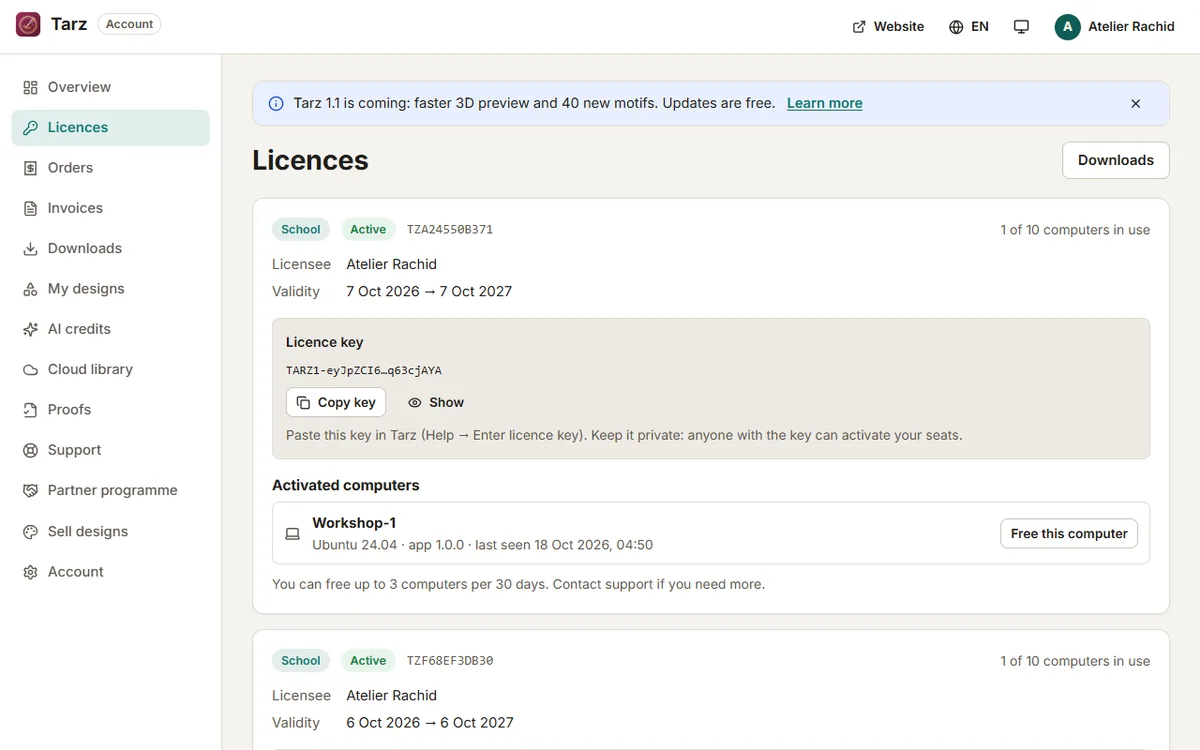
- If the old computer still works: open Tarz on it, click Licence → Deactivate this computer. The seat is freed immediately and Tarz returns to the Free edition on that computer.
- If the old computer is broken, sold or lost: sign in to your account, open Licences, find the device in the list and click Deactivate.
- On the new computer, install Tarz (Windows or macOS) and activate the licence with your key or your account.
- Copy your
.tarzprojects with a USB stick or a cloud folder: they are not stored online.
Limits
You can free up to 3 devices every 30 days yourself. This protects your licence if your key leaks. If you need more (a workshop changing all its computers, for example), contact support with your order number: we free the seats for you.
Reinstalling Windows on the same computer
A fresh installation of the system usually keeps the same computer ID, so the licence is reactivated without using a new seat. If Tarz says all seats are used, free the old entry in your account first.